# NeuroDB 2.0 Documentation
# Introduction
NeuroDB is an in-memory graph database engine that enables graph data creation, editing, retrieval, and advanced graph applications built on complex graph algorithms using the Neuro-Cypher query language.
# What's New in Version 2.0
Compared to version 1.0, NeuroDB 2.0 has undergone major upgrades in the following areas:
- Master-Slave Replication Cluster: employing a state-machine-driven full + incremental replication mechanism, supporting a one-master-multiple-slave architecture for high data availability and read-write separation
- Industrial-Grade Cypher Parser: Refactored lexer/parser using Flex/Bison, with 2-3x parsing speed improvement, character-level error positioning, and significantly improved code maintainability and extensibility
- Regular Expression Support: The
=~operator now fully supports standard regular expressions (^,$,*,+,?,\d,\w, character classes, etc.), enabling complex format matching for emails, phone numbers, ID numbers, URLs, and more - Fast CSV Import: New
LOAD CSV FROM ... NODESandLOAD CSV FROM ... RELATIONSHIPShigh-speed batch import commands, dramatically improving data import efficiency
# Core Features
The main features of NeuroDB are:
- Lightweight: The entire engine executable is less than 400KB
- In-Memory: All graph data is fully loaded into memory for operations
- High Speed: With the entire database in memory, there is no disk I/O latency; 2.0 further accelerates query parsing with the Flex/Bison parser
- Embeddable: The database can be embedded into your projects similar to SQLite, eliminating the need for separate deployment and maintenance
- Cross-Platform: Runs on mainstream operating systems (Windows, Linux, Mac), mobile operating systems (Android, iPhone), and any embedded system or microcontroller capable of running C language target programs (such as STM32)
- Streamlined: Similar to Redis, it achieves a powerful, efficient, low-resource-consumption graph database engine through concise operation commands, simplified deployment and maintenance, and a lean software architecture
- Fully Independently Developed: Provides a domestic alternative to graph databases
- Edge Computing: Thanks to its lightweight nature, NeuroDB can be embedded into small and micro devices (on-chip) to achieve "edge computing"
- Clustering (New in 2.0): Supports master-slave replication with one master and multiple slaves for read-write separation and high data availability
- Graph Modeling Concepts: NeuroDB's visualization client implements a concept similar to object-oriented model-based "derivation" of graph data, allowing the design of node and relationship structures in modeling, and the design of properties on nodes or relationships (property names, property data types, property data lengths, etc.) similar to relational database table structures
This tutorial will teach you all the techniques of NeuroDB within one hour in a minimalist style! Here we go!
# Download, Installation, and Deployment
# Downloading the Distribution Package
Before installation and deployment, visit the download page (opens new window) to download the NeuroDB package for your operating system version. Installation is very simple — just extract the downloaded NeuroDB package to the directory where you usually keep your software.
# Docker Deployment
docker pull panggguoming/neurodb:2.0.0
# Package Directory Structure
The package directory structure is as follows:
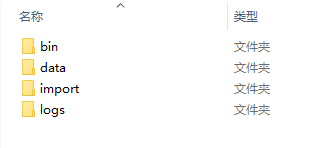
Where:
- The
bindirectory contains the NeuroDB server and client executable programs - The
datadirectory contains persistent storage data files - The
importdirectory contains data files to be imported (CSV files) - The
logsdirectory contains runtime logs
After deployment:
- Launching
NEURO_SERVERin thebindirectory starts the NeuroDB service, which occupies port 8839 by default. If you want to change the port, see how to modify it in the "Operations Management" chapter below. - Launching
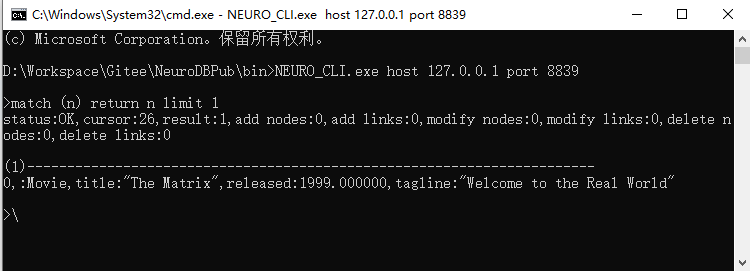
NEURO_CLIin thebindirectory starts the command-line client, which connects to localhost port 8839 by default. You can modify the default connection IP and port by adding the parametershost 127.0.0.1 port 8839. You can directly enter commands in the client and view execution results. - For a more visual and convenient way to run commands and view results, we recommend downloading and installing NeuroStudio (opens new window), the desktop visualization client. "NeuroStudio" provides powerful, user-friendly visual UI components to enhance the experience of operating and displaying graph data. Subsequent examples in this tutorial will use NeuroStudio screenshots to show results. Installation and running are very simple — just extract and run
neuro-Studio.exein the root directory. NeuroStudio is an optional package; if you only need to run commands without visual display, you do not need to download and install "NeuroStudio".
# Starting NeuroDB
# Windows
Extract the package to any directory and run NEURO_SERVER.exe in the bin directory. This is the NeuroDB server. It can also be run from the command line.
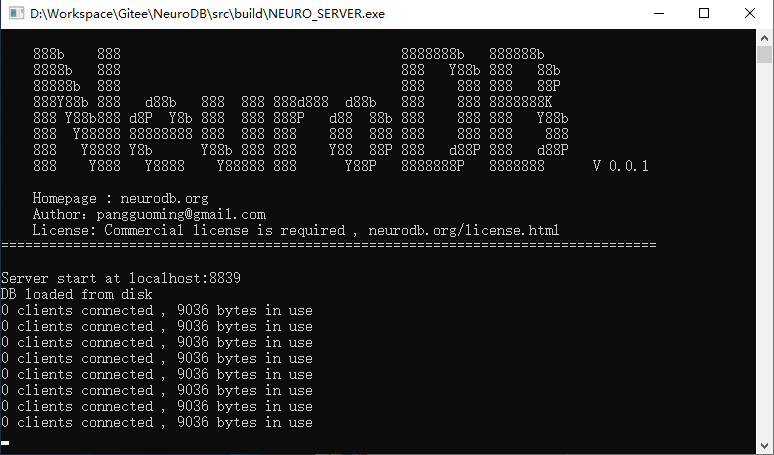
The command-line client is NEURO_CLI.exe. Start this program after the server is running. To connect to a specified IP and port by entering parameters, start it from the command line with the following command. Once NEURO_CLI is started, you can directly enter Neuro-Cypher commands in the command line to execute and view the results.
# Linux
Extract the package to any directory and grant executable permission to NEURO_SERVER in the bin directory:
chmod +x NEURO_SERVER
Then simply run NEURO_SERVER:
./NEURO_SERVER
Alternatively, you can use the nohup command to run it in the background:
nohup ./NEURO_SERVER &
Then start the client to connect to the server and execute commands:
./NEURO_CLI
# Mac
Extract the package to any directory and run NEURO_SERVER in the bin directory:
./NEURO_SERVER
Then start the client to connect to the server and execute commands:
./NEURO_CLI
# Quick Start
# Creating a Social Network Graph Example
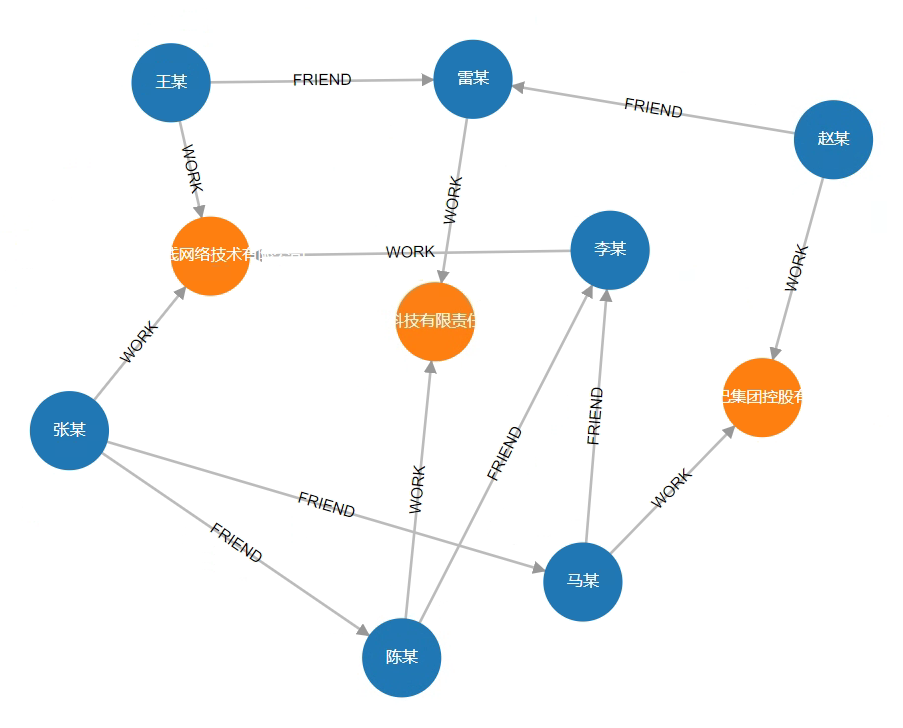
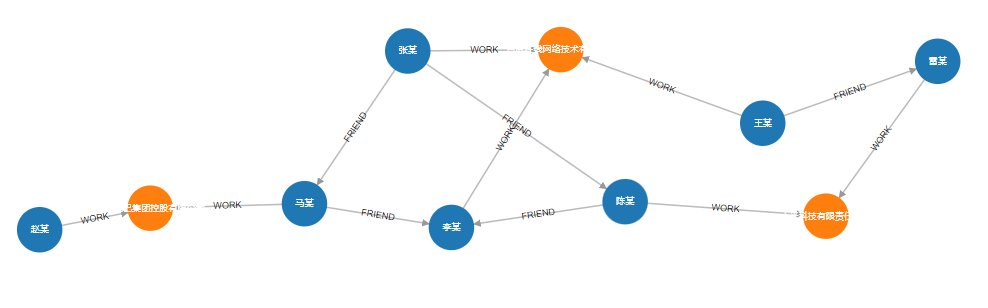
Create Company and Person nodes, as well as WORK relationships between companies and people, and FRIEND relationships between people, thereby constructing a simple social network.
CREATE
  (Xiaomi:Company {name:"小米科技有限责任公司", create_at:2010, tagline:"致力于让全球每个人都能享受科技带来的美好生活"})
, (Alibaba:Company {name:"阿里巴巴集团控股有限公司", create_at:1999, tagline:"旨在构建未来的商业基础设施"})
, (Baidu:Company {name:"百度在线网络技术有限公司", create_at:2000, tagline:"是拥有强大互联网基础的领先AI公司"})
, (Leimou:Person {name:"雷某", born:1969})
, (Mamou:Person {name:"马某", born:1964})
, (Limou:Person {name:"李某", born:1968})
, (Chenmou:Person {name:"陈某", born:1960})
, (Zhangmou:Person {name:"张某", born:1967})
, (Wangmou:Person {name:"王某", born:1965})
, (Zhaomou:Person {name:"赵某", born:1952})
, (Leimou)-[:WORK {position:"CEO"}]->(Xiaomi)
, (Chenmou)-[:WORK {position:"员工"}]->(Xiaomi)
, (Mamou)-[:WORK {position:"CEO"}]->(Alibaba)
, (Zhaomou)-[:WORK {position:"员工"}]->(Alibaba)
, (Limou)-[:WORK {position:"CEO"}]->(Baidu)
, (Wangmou)-[:WORK {position:"员工"}]->(Baidu)
, (Zhangmou)-[:WORK {position:"员工"}]->(Baidu)
, (Wangmou)-[:FRIEND{weight:2}]->(Leimou)
, (Zhaomou)-[:FRIEND{weight:1}]->(Leimou)
, (Zhangmou)-[:FRIEND{weight:4}]->(Mamou)
, (Zhangmou)-[:FRIEND{weight:8}]->(Chenmou)
, (Chenmou)-[:FRIEND{weight:5}]->(Limou)
, (Mamou)-[:FRIEND{weight:10}]->(Limou)
After creation, the visual result is as follows:
# Retrieval
# 1. Query the person named "王某"
MATCH (n:Person{name:"王某"}) RETURN n
Result:
status:OK,cursor:40,result:1,add nodes:0,add links:0,modify nodes:0,modify links:0,delete nodes:0,delete links:0

(1)-----------------------------------------------------------------------
 ID:8 LABELS:Person PROPS:{name:"王某",born:1965.000000}
# 2. Query people born after 1965
MATCH (n:Person) WHERE n.born > 1965 RETURN n
Result:
status:OK,cursor:45,result:3,add nodes:0,add links:0,modify nodes:0,modify links:0,delete nodes:0,delete links:0

(1)-----------------------------------------------------------------------
 ID:3 LABELS:Person PROPS:{name:"雷某",born:1969.000000}
(2)-----------------------------------------------------------------------
 ID:5 LABELS:Person PROPS:{name:"李某",born:1968.000000}
(3)-----------------------------------------------------------------------
 ID:7 LABELS:Person PROPS:{name:"张某",born:1967.000000}
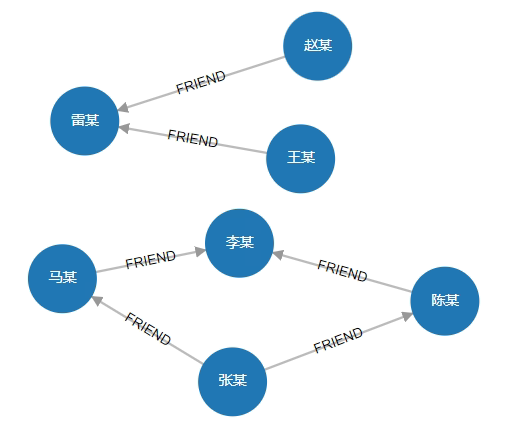
# 3. Query all "FRIEND" relationships
MATCH (n)-[r:FRIEND]->(m) RETURN n,r,m
Result:
status:OK,cursor:38,result:6,add nodes:0,add links:0,modify nodes:0,modify links:0,delete nodes:0,delete links:0

(1)-----------------------------------------------------------------------
 ID:4 LABELS:Person PROPS:{name:"马某",born:1964.000000}         ID:12 HEAD:4 TAIL:5 TYPE:FRIEND PROPS:{weight:10}    ID:5 LABELS:Person PROPS:{name:"李某",born:1968.000000}

(2)-----------------------------------------------------------------------
 ID:6 LABELS:Person PROPS:{name:"陈某",born:1960.000000}         ID:11 HEAD:6 TAIL:5 TYPE:FRIEND PROPS:{weight:5}    ID:5 LABELS:Person PROPS:{name:"李某",born:1968.000000}

(3)-----------------------------------------------------------------------
 ID:7 LABELS:Person PROPS:{name:"张某",born:1967.000000}         ID:10 HEAD:7 TAIL:6 TYPE:FRIEND PROPS:{weight:8}    ID:6 LABELS:Person PROPS:{name:"陈某",born:1960.000000}

(4)-----------------------------------------------------------------------
 ID:7 LABELS:Person PROPS:{name:"张某",born:1967.000000}         ID:9 HEAD:7 TAIL:4 TYPE:FRIEND PROPS:{weight:4}     ID:4 LABELS:Person PROPS:{name:"马某",born:1964.000000}

(5)-----------------------------------------------------------------------
 ID:8 LABELS:Person PROPS:{name:"王某",born:1965.000000}         ID:7 HEAD:8 TAIL:3 TYPE:FRIEND PROPS:{weight:2}     ID:3 LABELS:Person PROPS:{name:"雷某",born:1969.000000}

(6)-----------------------------------------------------------------------
 ID:9 LABELS:Person PROPS:{name:"赵某",born:1952.000000}         ID:8 HEAD:9 TAIL:3 TYPE:FRIEND PROPS:{weight:1}     ID:3 LABELS:Person PROPS:{name:"雷某",born:1969.000000}
Visualization:
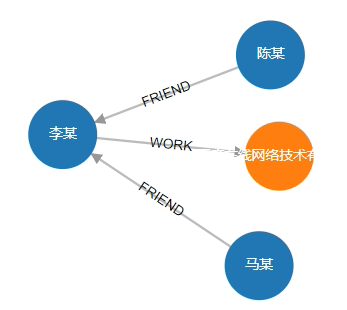
# 4. Query all "first-degree" relationships associated with the person "李某"
MATCH (n:Person{name:"李某"})-[r]-(m) RETURN n,r,m
Result:
status:OK,cursor:52,result:3,add nodes:0,add links:0,modify nodes:0,modify links:0,delete nodes:0,delete links:0

(1)-----------------------------------------------------------------------
 ID:5 LABELS:Person PROPS:{name:"李某",born:1968.000000}  ID:4 HEAD:5 TAIL:2 TYPE:WORK PROPS:{position:"CEO"}  ID:2 LABELS:Company PROPS:{name:"百度在线网络技术有限公司",create_at:2000.000000,tagline:"是拥有强大互联网基础的领先AI公司"}
(2)-----------------------------------------------------------------------
 ID:5 LABELS:Person PROPS:{name:"李某",born:1968.000000}  ID:12 HEAD:4 TAIL:5 TYPE:FRIEND PROPS:{weight:10}  ID:4 LABELS:Person PROPS:{name:"马某",born:1964.000000}
(3)-----------------------------------------------------------------------
 ID:5 LABELS:Person PROPS:{name:"李某",born:1968.000000}  ID:11 HEAD:6 TAIL:5 TYPE:FRIEND PROPS:{weight:5}  ID:6 LABELS:Person PROPS:{name:"陈某",born:1960.000000}
Visualization:
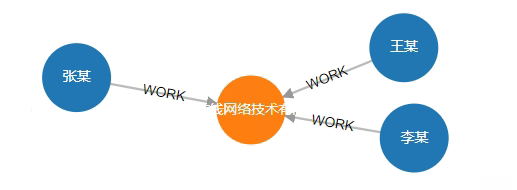
# 5. Find the company where "张某" works and all his colleagues
MATCH (n:Person{name:"张某"})-[w1:WORK]-> (c:Company) <-[w2:WORK]-(n2) RETURN n,w1,c,w2,n2
Result:
status:OK,cursor:93,result:2,add nodes:0,add links:0,modify nodes:0,modify links:0,delete nodes:0,delete links:0

(1)-----------------------------------------------------------------------
 ID:7 LABELS:Person PROPS:{name:"张某",born:1967.000000}  ID:6 HEAD:7 TAIL:2 TYPE:WORK PROPS:{}  ID:2 LABELS:Company PROPS:{name:"百度在线网络技术有限公司",create_at:2000.000000,tagline:"是拥有强大互联网基础的领先AI公司"}  ID:5 HEAD:8 TAIL:2 TYPE:WORK PROPS:{position:"员工"}  ID:8 LABELS:Person PROPS:{name:"王某",born:1965.000000}
(2)-----------------------------------------------------------------------
 ID:7 LABELS:Person PROPS:{name:"张某",born:1967.000000}  ID:6 HEAD:7 TAIL:2 TYPE:WORK PROPS:{}  ID:2 LABELS:Company PROPS:{name:"百度在线网络技术有限公司",create_at:2000.000000,tagline:"是拥有强大互联网基础的领先AI公司"}  ID:4 HEAD:5 TAIL:2 TYPE:WORK PROPS:{position:"CEO"}  ID:5 LABELS:Person PROPS:{name:"李某",born:1968.000000}
Visualization:
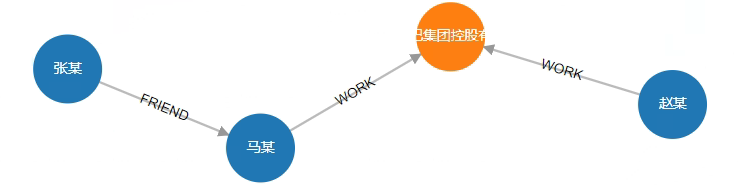
# 6. Find the shortest path between "张某" and "赵某"
From the result below we can see that Zhang is a friend of Ma, and Ma and Zhao are colleagues at the same company.
MATCH path=(start :Person{name:"张某"})-[rels *<]- (end :Person{name:"赵某"}) RETURN path
Result:
status:OK,cursor:95,result:1,add nodes:0,add links:0,modify nodes:0,modify links:0,delete nodes:0,delete links:0

(1)-----------------------------------------------------------------------
 ID:7 LABELS:Person PROPS:{name:"张某",born:1967.000000}  ID:9 HEAD:7 TAIL:4 TYPE:FRIEND PROPS:{weight:4} ID:4 LABELS:Person PROPS:{name:"马某",born:1964.000000} ID:2 HEAD:4 TAIL:1 TYPE:WORK PROPS:{position:"CEO"} ID:1 LABELS:Company PROPS:{name:"阿里巴巴集团控股有限公司",create_at:1999.000000,tagline:"旨在构建未来的商业基础设施"} ID:3 HEAD:9 TAIL:1 TYPE:WORK PROPS:{position:"员工"}  ID:9 LABELS:Person PROPS:{name:"赵某",born:1952.000000}
Visualization:
# Modification
# 1. Add a gender property to the person "张某"
MATCH (n :Person{name:"张某"}) SET n.sex="男" RETURN n
# 2. Modify the gender property of the person "张某" to female
MATCH (n :Person{name:"张某"}) SET n.sex="女" RETURN n
# Deletion
Be careful with deletion operations. If a node has any associated relationships, it cannot be directly deleted — you need to delete all its relationships first before deleting the node itself. Alternatively, you can use the DETACH DELETE command to delete all associated relationships and the node in a single step.
# 1. Delete the FRIEND relationship between Zhang and Ma
MATCH (n :Person{name:"张某"})-[r:FRIEND]->(m :Person{name:"马某"}) DELETE r
# 2. Delete the person "张某" node
This command will indicate that deletion is not possible because Zhang still has two associated relationships that have not been deleted. This command will only succeed after deleting all associated relationships of this node using the above command.
MATCH (n :Person{name:"张某"}) DELETE n
# 3. Delete the person "张某" node and all its associated relationships in one step
This command will not encounter a deletion failure because it deletes all associated relationships and then the node in a single command.
MATCH (n :Person{name:"张某"}) DETACH DELETE n
# Summary
At this point, we have quickly experienced a social network example with NeuroDB. The data volume in the example is very small, but this makes it easy for us to run and understand. In practical applications, NeuroDB supports graphs composed of massive amounts of data.
# Neuro-Cypher Commands
Neuro-Cypher is a declarative graph database query language with rich expressiveness, capable of efficiently querying and updating graph data.
2.0 Parser Upgrade: NeuroDB 2.0 uses an industrial-grade lexer/parser built with Flex/Bison, replacing the 1.0 hand-written parser. The new parser achieves 2-3x faster parsing speed, character-level error positioning, and 5x and 10x improvements in code maintainability and syntax extensibility, respectively. Build dependencies include Flex >= 2.5 and Bison >= 3.0. At the user level, it is fully compatible with 1.0 syntax.
# Graph Data Structure
A graph consists of nodes and relationships. Nodes may also have labels and properties, and relationships have types and properties. Nodes represent entities, and relationships connect pairs of nodes. Nodes can be viewed as somewhat analogous to tables in a relational database, but not entirely. Node labels can be understood as different table names, and properties are similar to columns in relational database tables. The data of a node is similar to a row of data in a relational database table. Nodes with the same label typically have similar properties.
# Patterns
We can encode complex ideas as numerous nodes and relationships through patterns. The Neuro-Cypher query language relies heavily on describing patterns. A pattern can be as simple as a pair of nodes and the relationship connecting them. For example, a person LIVES_IN a certain city, or a certain city is PART_OF a certain country. Patterns can also be complex, using multiple relationships to express complex concepts, thus supporting a variety of interesting use cases. For example, the following Cypher code connects two simple patterns together:
(:Person) -[:WORK]-> (:Company)
# Describing Nodes
Cypher uses a pair of parentheses to represent nodes, such as: (), (foo). Below are some common node representations:
()                                               -- Empty node
(xiaomi)                                         -- Empty node with only a variable name
(:Company)                                       -- Node with a label definition
(xiaomi:Company)                                 -- Node with a variable name and label definition
(xiaomi:Company {name: "xiaomi"})                -- Node with a variable name, label, and one name property
(xiaomi:Company {name: "xiaomi", create_at: 1997}) -- Node with a variable name, label, and two properties
# Describing Relationships
Cypher uses a pair of dashes (i.e., --) to represent an undirected relationship. A directed relationship adds an arrow on one end (i.e., <-- or -->). Square bracket expressions [...] can be used to add details. They can contain variables, properties, and/or type information. Common relationship representations are as follows:
-->                                              -- Empty relationship
-[role]->                                        -- Empty relationship with only a variable name
-[:WORK]->                                       -- Relationship with a type
-[role:WORK]->                                   -- Relationship with a variable name and type
-[role:WORK {position: "CEO"}]->                 -- Relationship with a variable name, type, and one property
# Pattern Syntax
The above node and relationship syntax can be combined to express patterns. Below is a simple pattern:
(leimou:Person {name:"雷某", born:1969})-[:WORK {position:"CEO"}]->
 (Xiaomi:Company {name:"小米科技有限责任公司", create_at:2010, tagline:"致力于让全球每个人都能享受科技带来的美好生活"})
# Data Types
Cypher supports the following data types:
Property types:
- Integer
- Double
- String
- Boolean
- Integer Array
- String Array
Structural types:
- Node
- Relationship
- Path
# MATCH Command
The MATCH statement is used to retrieve data from the database using specified patterns. It is often used together with a WHERE clause that includes constraints or predicates.
# Finding Nodes
1. Query all nodes
If there is only one variable in the pattern with no other constraints, all nodes are returned:
MATCH (n) RETURN n
Result:
status:OK,cursor:18,result:10,add nodes:0,add links:0,modify nodes:0,modify links:0,delete nodes:0,delete links:0

(1)-----------------------------------------------------------------------
 ID:0 LABELS:Company PROPS:{name:"小米科技有限责任公司",create_at:2010.000000,tagline:"致力于让全球每个人都能享受科技带来的美好生活"}
(2)-----------------------------------------------------------------------
 ID:1 LABELS:Company PROPS:{name:"阿里巴巴集团控股有限公司",create_at:1999.000000,tagline:"旨在构建未来的商业基础设施"}
(3)-----------------------------------------------------------------------
 ID:2 LABELS:Company PROPS:{name:"百度在线网络技术有限公司",create_at:2000.000000,tagline:"是拥有强大互联网基础的领先AI公司"}
(4)-----------------------------------------------------------------------
 ID:3 LABELS:Person PROPS:{name:"雷某",born:1969.000000}
(5)-----------------------------------------------------------------------
 ID:4 LABELS:Person PROPS:{name:"马某",born:1964.000000}
(6)-----------------------------------------------------------------------
 ID:5 LABELS:Person PROPS:{name:"李某",born:1968.000000}
(7)-----------------------------------------------------------------------
 ID:6 LABELS:Person PROPS:{name:"陈某",born:1960.000000}
(8)-----------------------------------------------------------------------
 ID:7 LABELS:Person PROPS:{name:"张某",born:1967.000000}
(9)-----------------------------------------------------------------------
 ID:8 LABELS:Person PROPS:{name:"王某",born:1965.000000}
(10)-----------------------------------------------------------------------
 ID:9 LABELS:Person PROPS:{name:"赵某",born:1952.000000}
2. Query all nodes with a specific label
Add the :Company label to the node in the pattern:
MATCH (n:Company) RETURN n
Result:
status:OK,cursor:26,result:3,add nodes:0,add links:0,modify nodes:0,modify links:0,delete nodes:0,delete links:0

(1)-----------------------------------------------------------------------
 ID:0 LABELS:Company PROPS:{name:"小米科技有限责任公司",create_at:2010.000000,tagline:"致力于让全球每个人都能享受科技带来的美好生活"}
(2)-----------------------------------------------------------------------
 ID:1 LABELS:Company PROPS:{name:"阿里巴巴集团控股有限公司",create_at:1999.000000,tagline:"旨在构建未来的商业基础设施"}
(3)-----------------------------------------------------------------------
 ID:2 LABELS:Company PROPS:{name:"百度在线网络技术有限公司",create_at:2000.000000,tagline:"是拥有强大互联网基础的领先AI公司"}
3. Query the node with ID 0
MATCH (n #0) RETURN n
Result:
status:OK,cursor:21,result:1,add nodes:0,add links:0,modify nodes:0,modify links:0,delete nodes:0,delete links:0

(1)-----------------------------------------------------------------------
 ID:0 LABELS:Company PROPS:{name:"小米科技有限责任公司",create_at:2010.000000,tagline:"致力于让全球每个人都能享受科技带来的美好生活"}
# Finding Relationships
1. Find relationships by direction
The direction of a relationship can be indicated by --> or <--. For example, to find all relationships pointing outward from the person "王某":
MATCH (:Person { name:"王某" })-->(m) RETURN m
Conversely, to find all relationships pointing toward Wang:
MATCH (:Person { name:"王某" })<--(m) RETURN m
Since the above two commands have no constraints on the relationships, they will find all relationships pointing out from and pointing to Wang.
2. Add a variable to a relationship and return it
MATCH (:Person { name:"王某" })-[r]->() RETURN r
Result:
status:OK,cursor:48,result:3,add nodes:0,add links:0,modify nodes:0,modify links:0,delete nodes:0,delete links:0

(1)-----------------------------------------------------------------------
 ID:10 HEAD:7 TAIL:6 TYPE:FRIEND PROPS:{weight:8}
(2)-----------------------------------------------------------------------
 ID:9 HEAD:7 TAIL:4 TYPE:FRIEND PROPS:{weight:4}
(3)-----------------------------------------------------------------------
 ID:6 HEAD:7 TAIL:2 TYPE:WORK PROPS:{}
3. Find the relationship with ID 0
MATCH ()-[r #0]->() RETURN r
Result:
status:OK,cursor:28,result:1,add nodes:0,add links:0,modify nodes:0,modify links:0,delete nodes:0,delete links:0

(1)-----------------------------------------------------------------------
 ID:0 HEAD:3 TAIL:0 TYPE:WORK PROPS:{position:"CEO"}
4. Match relationship types: Query all "FRIEND" relationships
MATCH (n)-[r:FRIEND]->(m) RETURN n,r,m
Result:
status:OK,cursor:38,result:6,add nodes:0,add links:0,modify nodes:0,modify links:0,delete nodes:0,delete links:0

(1)-----------------------------------------------------------------------
 ID:4 LABELS:Person PROPS:{name:"马某",born:1964.000000}         ID:12 HEAD:4 TAIL:5 TYPE:FRIEND PROPS:{weight:10}    ID:5 LABELS:Person PROPS:{name:"李某",born:1968.000000}

(2)-----------------------------------------------------------------------
 ID:6 LABELS:Person PROPS:{name:"陈某",born:1960.000000}         ID:11 HEAD:6 TAIL:5 TYPE:FRIEND PROPS:{weight:5}    ID:5 LABELS:Person PROPS:{name:"李某",born:1968.000000}

(3)-----------------------------------------------------------------------
 ID:7 LABELS:Person PROPS:{name:"张某",born:1967.000000}         ID:10 HEAD:7 TAIL:6 TYPE:FRIEND PROPS:{weight:8}    ID:6 LABELS:Person PROPS:{name:"陈某",born:1960.000000}

(4)-----------------------------------------------------------------------
 ID:7 LABELS:Person PROPS:{name:"张某",born:1967.000000}         ID:9 HEAD:7 TAIL:4 TYPE:FRIEND PROPS:{weight:4}     ID:4 LABELS:Person PROPS:{name:"马某",born:1964.000000}

(5)-----------------------------------------------------------------------
 ID:8 LABELS:Person PROPS:{name:"王某",born:1965.000000}         ID:7 HEAD:8 TAIL:3 TYPE:FRIEND PROPS:{weight:2}     ID:3 LABELS:Person PROPS:{name:"雷某",born:1969.000000}

(6)-----------------------------------------------------------------------
 ID:9 LABELS:Person PROPS:{name:"赵某",born:1952.000000}         ID:8 HEAD:9 TAIL:3 TYPE:FRIEND PROPS:{weight:1}     ID:3 LABELS:Person PROPS:{name:"雷某",born:1969.000000}
5. Match multiple relationship types: Find relationships of type FRIEND or WORK
MATCH ()-[r:FRIEND|WORK]->() RETURN r
Result:
status:OK,cursor:37,result:13,add nodes:0,add links:0,modify nodes:0,modify links:0,delete nodes:0,delete links:0

(1)-----------------------------------------------------------------------
 ID:0 HEAD:3 TAIL:0 TYPE:WORK PROPS:{position:"CEO"}
(2)-----------------------------------------------------------------------
 ID:12 HEAD:4 TAIL:5 TYPE:FRIEND PROPS:{weight:10}
(3)-----------------------------------------------------------------------
 ID:2 HEAD:4 TAIL:1 TYPE:WORK PROPS:{position:"CEO"}
(4)-----------------------------------------------------------------------
 ID:4 HEAD:5 TAIL:2 TYPE:WORK PROPS:{position:"CEO"}
(5)-----------------------------------------------------------------------
 ID:11 HEAD:6 TAIL:5 TYPE:FRIEND PROPS:{weight:5}
(6)-----------------------------------------------------------------------
 ID:1 HEAD:6 TAIL:0 TYPE:WORK PROPS:{position:"员工"}
(7)-----------------------------------------------------------------------
 ID:10 HEAD:7 TAIL:6 TYPE:FRIEND PROPS:{weight:8}
(8)-----------------------------------------------------------------------
 ID:9 HEAD:7 TAIL:4 TYPE:FRIEND PROPS:{weight:4}
(9)-----------------------------------------------------------------------
 ID:6 HEAD:7 TAIL:2 TYPE:WORK PROPS:{}
(10)-----------------------------------------------------------------------
 ID:7 HEAD:8 TAIL:3 TYPE:FRIEND PROPS:{weight:2}
(11)-----------------------------------------------------------------------
 ID:5 HEAD:8 TAIL:2 TYPE:WORK PROPS:{position:"员工"}
(12)-----------------------------------------------------------------------
 ID:8 HEAD:9 TAIL:3 TYPE:FRIEND PROPS:{}
(13)-----------------------------------------------------------------------
 ID:3 HEAD:9 TAIL:1 TYPE:WORK PROPS:{position:"员工"}
6. Find relationships with the property "position" equal to "CEO"
MATCH ()-[r {position:"CEO"}]->() RETURN r
Result:
status:OK,cursor:42,result:3,add nodes:0,add links:0,modify nodes:0,modify links:0,delete nodes:0,delete links:0

(1)-----------------------------------------------------------------------
 ID:0 HEAD:3 TAIL:0 TYPE:WORK PROPS:{position:"CEO"}
(2)-----------------------------------------------------------------------
 ID:2 HEAD:4 TAIL:1 TYPE:WORK PROPS:{position:"CEO"}
(3)-----------------------------------------------------------------------
 ID:4 HEAD:5 TAIL:2 TYPE:WORK PROPS:{position:"CEO"}
7. Find patterns composed of multiple relationships
This means specifying the length of relationships, such as finding a pattern composed of two relationships and three nodes, which we call a pattern of length 2:
MATCH (n1)-[r1]->(n2)-[r2]->(n3) RETURN n1,r1,n2,r2,n3
Result:
status:OK,cursor:54,result:8,add nodes:0,add links:0,modify nodes:0,modify links:0,delete nodes:0,delete links:0

(1)-----------------------------------------------------------------------
 ID:4 LABELS:Person PROPS:{name:"马某",born:1964.000000}  ID:12 HEAD:4 TAIL:5 TYPE:FRIEND PROPS:{weight:10}  ID:5 LABELS:Person PROPS:{name:"李某",born:1968.000000}  ID:4 HEAD:5 TAIL:2 TYPE:WORK PROPS:{position:"CEO"}  ID:2 LABELS:Company PROPS:{name:"百度在线网络技术有限公司",create_at:2000.000000,tagline:"是拥有强大互联网基础的领先AI公司"}
(2)-----------------------------------------------------------------------
 ID:6 LABELS:Person PROPS:{name:"陈某",born:1960.000000}  ID:11 HEAD:6 TAIL:5 TYPE:FRIEND PROPS:{weight:5}  ID:5 LABELS:Person PROPS:{name:"李某",born:1968.000000}  ID:4 HEAD:5 TAIL:2 TYPE:WORK PROPS:{position:"CEO"}  ID:2 LABELS:Company PROPS:{name:"百度在线网络技术有限公司",create_at:2000.000000,tagline:"是拥有强大互联网基础的领先AI公司"}
(3)-----------------------------------------------------------------------
 ID:7 LABELS:Person PROPS:{name:"张某",born:1967.000000}  ID:10 HEAD:7 TAIL:6 TYPE:FRIEND PROPS:{weight:8}  ID:6 LABELS:Person PROPS:{name:"陈某",born:1960.000000}  ID:11 HEAD:6 TAIL:5 TYPE:FRIEND PROPS:{weight:5}  ID:5 LABELS:Person PROPS:{name:"李某",born:1968.000000}
(4)-----------------------------------------------------------------------
 ID:7 LABELS:Person PROPS:{name:"张某",born:1967.000000}  ID:10 HEAD:7 TAIL:6 TYPE:FRIEND PROPS:{weight:8}  ID:6 LABELS:Person PROPS:{name:"陈某",born:1960.000000}  ID:1 HEAD:6 TAIL:0 TYPE:WORK PROPS:{position:"员工"}  ID:0 LABELS:Company PROPS:{name:"小米科技有限责任公司",create_at:2010.000000,tagline:"致力于让全球每个人都能享受科技带来的美好生活"}
(5)-----------------------------------------------------------------------
 ID:7 LABELS:Person PROPS:{name:"张某",born:1967.000000}  ID:9 HEAD:7 TAIL:4 TYPE:FRIEND PROPS:{weight:4}  ID:4 LABELS:Person PROPS:{name:"马某",born:1964.000000}  ID:12 HEAD:4 TAIL:5 TYPE:FRIEND PROPS:{weight:10}  ID:5 LABELS:Person PROPS:{name:"李某",born:1968.000000}
(6)-----------------------------------------------------------------------
 ID:7 LABELS:Person PROPS:{name:"张某",born:1967.000000}  ID:9 HEAD:7 TAIL:4 TYPE:FRIEND PROPS:{weight:4}  ID:4 LABELS:Person PROPS:{name:"马某",born:1964.000000}  ID:2 HEAD:4 TAIL:1 TYPE:WORK PROPS:{position:"CEO"}  ID:1 LABELS:Company PROPS:{name:"阿里巴巴集团控股有限公司",create_at:1999.000000,tagline:"旨在构建未来的商业基础设施"}
(7)-----------------------------------------------------------------------
 ID:8 LABELS:Person PROPS:{name:"王某",born:1965.000000}  ID:7 HEAD:8 TAIL:3 TYPE:FRIEND PROPS:{weight:2}  ID:3 LABELS:Person PROPS:{name:"雷某",born:1969.000000}  ID:0 HEAD:3 TAIL:0 TYPE:WORK PROPS:{position:"CEO"}  ID:0 LABELS:Company PROPS:{name:"小米科技有限责任公司",create_at:2010.000000,tagline:"致力于让全球每个人都能享受科技带来的美好生活"}
(8)-----------------------------------------------------------------------
 ID:9 LABELS:Person PROPS:{name:"赵某",born:1952.000000}  ID:8 HEAD:9 TAIL:3 TYPE:FRIEND PROPS:{}  ID:3 LABELS:Person PROPS:{name:"雷某",born:1969.000000}  ID:0 HEAD:3 TAIL:0 TYPE:WORK PROPS:{position:"CEO"}  ID:0 LABELS:Company PROPS:{name:"小米科技有限责任公司",create_at:2010.000000,tagline:"致力于让全球每个人都能享受科技带来的美好生活"}
# Finding Paths
1. Find variable-length paths
Find patterns with a minimum relationship length of 2, i.e., all relationships with a length greater than or equal to 2 and their start and end nodes:
MATCH (n1:Person{name:"王某"})-[r*2..]->(n2) RETURN n1,r,n2
Result:
status:OK,cursor:61,result:1,add nodes:0,add links:0,modify nodes:0,modify links:0,delete nodes:0,delete links:0

(1)-----------------------------------------------------------------------
 ID:8 LABELS:Person PROPS:{name:"王某",born:1965.000000}  ID:7 HEAD:8 TAIL:3 TYPE:FRIEND PROPS:{weight:2}  ID:0 HEAD:3 TAIL:0 TYPE:WORK PROPS:{position:"CEO"}  ID:0 LABELS:Company PROPS:{name:"小米科技有限责任公司",create_at:2010.000000,tagline:"致力于让全球每个人都能享受科技带来的美好生活"}
2. Find patterns with a maximum relationship length of 2
That is, relationships of length 1 and length 2 and their start and end nodes:
MATCH (n1:Person{name:"王某"})-[r*..2]->(n2) RETURN n1,r,n2
Result:
status:OK,cursor:61,result:3,add nodes:0,add links:0,modify nodes:0,modify links:0,delete nodes:0,delete links:0

(1)-----------------------------------------------------------------------
 ID:8 LABELS:Person PROPS:{name:"王某",born:1965.000000}  ID:7 HEAD:8 TAIL:3 TYPE:FRIEND PROPS:{weight:2}  ID:0 HEAD:3 TAIL:0 TYPE:WORK PROPS:{position:"CEO"}  ID:0 LABELS:Company PROPS:{name:"小米科技有限责任公司",create_at:2010.000000,tagline:"致力于让全球每个人都能享受科技带来的美好生活"}
(2)-----------------------------------------------------------------------
 ID:8 LABELS:Person PROPS:{name:"王某",born:1965.000000}  ID:5 HEAD:8 TAIL:2 TYPE:WORK PROPS:{position:"员工"}  ID:2 LABELS:Company PROPS:{name:"百度在线网络技术有限公司",create_at:2000.000000,tagline:"是拥有强大互联网基础的领先AI公司"}
(3)-----------------------------------------------------------------------
 ID:8 LABELS:Person PROPS:{name:"王某",born:1965.000000}  ID:7 HEAD:8 TAIL:3 TYPE:FRIEND PROPS:{weight:2}  ID:3 LABELS:Person PROPS:{name:"雷某",born:1969.000000}
3. Find all relationships and their start and end nodes with a specified length of exactly 3
MATCH (n1)-[r*3..3]->(n2) RETURN n1,r,n2
Result:
status:OK,cursor:40,result:2,add nodes:0,add links:0,modify nodes:0,modify links:0,delete nodes:0,delete links:0

(1)-----------------------------------------------------------------------
 ID:7 LABELS:Person PROPS:{name:"张某",born:1967.000000}  ID:10 HEAD:7 TAIL:6 TYPE:FRIEND PROPS:{weight:8}  ID:11 HEAD:6 TAIL:5 TYPE:FRIEND PROPS:{weight:5}  ID:4 HEAD:5 TAIL:2 TYPE:WORK PROPS:{position:"CEO"}  ID:2 LABELS:Company PROPS:{name:"百度在线网络技术有限公司",create_at:2000.000000,tagline:"是拥有强大互联网基础的领先AI公司"}
(2)-----------------------------------------------------------------------
 ID:7 LABELS:Person PROPS:{name:"张某",born:1967.000000}  ID:9 HEAD:7 TAIL:4 TYPE:FRIEND PROPS:{weight:4}  ID:12 HEAD:4 TAIL:5 TYPE:FRIEND PROPS:{weight:10}  ID:4 HEAD:5 TAIL:2 TYPE:WORK PROPS:{position:"CEO"}  ID:2 LABELS:Company PROPS:{name:"百度在线网络技术有限公司",create_at:2000.000000,tagline:"是拥有强大互联网基础的领先AI公司"}
4. Find patterns where the relationship length is between 2 and 3, and the starting node is the person "张某"
MATCH (n1:Person{name:"张某"})-[r*2..3]->(n2) RETURN n1,r,n2
Result:
status:OK,cursor:62,result:6,add nodes:0,add links:0,modify nodes:0,modify links:0,delete nodes:0,delete links:0

(1)-----------------------------------------------------------------------
 ID:7 LABELS:Person PROPS:{name:"张某",born:1967.000000}  ID:10 HEAD:7 TAIL:6 TYPE:FRIEND PROPS:{weight:8}  ID:1 HEAD:6 TAIL:0 TYPE:WORK PROPS:{position:"员工"}  ID:0 LABELS:Company PROPS:{name:"小米科技有限责任公司",create_at:2010.000000,tagline:"致力于让全球每个人都能享受科技带来的美好生活"}
(2)-----------------------------------------------------------------------
 ID:7 LABELS:Person PROPS:{name:"张某",born:1967.000000}  ID:9 HEAD:7 TAIL:4 TYPE:FRIEND PROPS:{weight:4}  ID:2 HEAD:4 TAIL:1 TYPE:WORK PROPS:{position:"CEO"}  ID:1 LABELS:Company PROPS:{name:"阿里巴巴集团控股有限公司",create_at:1999.000000,tagline:"旨在构建未来的商业基础设施"}
(3)-----------------------------------------------------------------------
 ID:7 LABELS:Person PROPS:{name:"张某",born:1967.000000}  ID:10 HEAD:7 TAIL:6 TYPE:FRIEND PROPS:{weight:8}  ID:11 HEAD:6 TAIL:5 TYPE:FRIEND PROPS:{weight:5}  ID:4 HEAD:5 TAIL:2 TYPE:WORK PROPS:{position:"CEO"}  ID:2 LABELS:Company PROPS:{name:"百度在线网络技术有限公司",create_at:2000.000000,tagline:"是拥有强大互联网基础的领先AI公司"}
(4)-----------------------------------------------------------------------
 ID:7 LABELS:Person PROPS:{name:"张某",born:1967.000000}  ID:9 HEAD:7 TAIL:4 TYPE:FRIEND PROPS:{weight:4}  ID:12 HEAD:4 TAIL:5 TYPE:FRIEND PROPS:{weight:10}  ID:4 HEAD:5 TAIL:2 TYPE:WORK PROPS:{position:"CEO"}  ID:2 LABELS:Company PROPS:{name:"百度在线网络技术有限公司",create_at:2000.000000,tagline:"是拥有强大互联网基础的领先AI公司"}
(5)-----------------------------------------------------------------------
 ID:7 LABELS:Person PROPS:{name:"张某",born:1967.000000}  ID:10 HEAD:7 TAIL:6 TYPE:FRIEND PROPS:{weight:8}  ID:11 HEAD:6 TAIL:5 TYPE:FRIEND PROPS:{weight:5}  ID:5 LABELS:Person PROPS:{name:"李某",born:1968.000000}
(6)-----------------------------------------------------------------------
 ID:7 LABELS:Person PROPS:{name:"张某",born:1967.000000}  ID:9 HEAD:7 TAIL:4 TYPE:FRIEND PROPS:{weight:4}  ID:12 HEAD:4 TAIL:5 TYPE:FRIEND PROPS:{weight:10}  ID:5 LABELS:Person PROPS:{name:"李某",born:1968.000000}
5. All-paths query
Query all paths between two nodes. This operation often returns a Cartesian product of all node relationships in the database, so it is very easy for the data volume to be too large to return. Readers should use this with caution.
MATCH (n1:Person{name:"张某"})-[*]->(n2:Person{name:"王某"}) RETURN n1,r,n2
The result set is too large to display here.
# Optimal Path Query
Optimal path queries can find the shortest path or the longest path, either by weight or by path length. We simply add a less-than sign or greater-than sign after the * in the relationship description of the pattern to indicate whether it is a shortest path or longest path search.
1. Find the shortest path between "张某" and "赵某"
Note that we have not added an arrow direction constraint. From the result below we can see that Zhang is a friend of Ma, and Ma and Zhao are colleagues at the same company.
MATCH path=(start :Person{name:"张某"})-[rels *<]- (end :Person{name:"赵某"}) RETURN path
Result:
status:OK,cursor:95,result:1,add nodes:0,add links:0,modify nodes:0,modify links:0,delete nodes:0,delete links:0

(1)-----------------------------------------------------------------------
 ID:7 LABELS:Person PROPS:{name:"张某",born:1967.000000}  ID:9 HEAD:7 TAIL:4 TYPE:FRIEND PROPS:{weight:4} ID:4 LABELS:Person PROPS:{name:"马某",born:1964.000000} ID:2 HEAD:4 TAIL:1 TYPE:WORK PROPS:{position:"CEO"} ID:1 LABELS:Company PROPS:{name:"阿里巴巴集团控股有限公司",create_at:1999.000000,tagline:"旨在构建未来的商业基础设施"} ID:3 HEAD:9 TAIL:1 TYPE:WORK PROPS:{position:"员工"}  ID:9 LABELS:Person PROPS:{name:"赵某",born:1952.000000}
Visualization:
2. Find the longest path between "张某" and "赵某"
MATCH path=(start :Person{name:"张某"})-[rels *>]- (end :Person{name:"赵某"}) RETURN path
The result data is too large to display here.
Visualization:
3. Find the shortest/longest path by weight
Use a certain property on the relationships along the path (which should be a numeric property) as a weight to be accumulated to obtain the total weight of the entire path, and use this to find the path with the minimum or maximum weight.
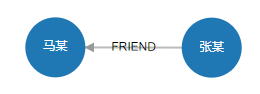
Find the shortest weight path between Ma and Zhang:
MATCH path=(start :Person{name:"马某"})-[ *<weight]- (end :Person{name:"张某"}) RETURN path
Result:
status:OK,cursor:97,result:1,add nodes:0,add links:0,modify nodes:0,modify links:0,delete nodes:0,delete links:0

(1)-----------------------------------------------------------------------
 ID:4 LABELS:Person PROPS:{name:"马某",born:1964.000000}  ID:9 HEAD:7 TAIL:4 TYPE:FRIEND PROPS:{weight:4.000000}  ID:7 LABELS:Person PROPS:{name:"张某",born:1967.000000}
Visualization:
Find the longest weight path between Ma and Zhang:
MATCH path=(start :Person{name:"马某"})-[ *>weight]- (end :Person{name:"张某"}) RETURN path
Result:
status:OK,cursor:97,result:1,add nodes:0,add links:0,modify nodes:0,modify links:0,delete nodes:0,delete links:0

(1)-----------------------------------------------------------------------
 ID:4 LABELS:Person PROPS:{name:"马某",born:1964.000000}  ID:12 HEAD:4 TAIL:5 TYPE:FRIEND PROPS:{weight:10.000000} ID:5 LABELS:Person PROPS:{name:"李某",born:1968.000000} ID:11 HEAD:6 TAIL:5 TYPE:FRIEND PROPS:{weight:5.000000} ID:6 LABELS:Person PROPS:{name:"陈某",born:1960.000000} ID:10 HEAD:7 TAIL:6 TYPE:FRIEND PROPS:{weight:8.000000}  ID:7 LABELS:Person PROPS:{name:"张某",born:1967.000000}
Visualization:

# RETURN Command
The RETURN command returns the pattern matching results by variable name, and in each result record the variables are sorted according to the order in which they appear after RETURN. Variables not in the variable list after RETURN will not be returned. We have already extensively used RETURN in the statement examples above, so it will not be elaborated on here.
Example:
MATCH (n1)-[r1]->(n2)-[r2]->(n3) RETURN n1,r1,n2,r2,n3
Result:
status:OK,cursor:54,result:8,add nodes:0,add links:0,modify nodes:0,modify links:0,delete nodes:0,delete links:0

(1)-----------------------------------------------------------------------
 ID:4 LABELS:Person PROPS:{name:"马某",born:1964.000000}  ID:12 HEAD:4 TAIL:5 TYPE:FRIEND PROPS:{weight:10}  ID:5 LABELS:Person PROPS:{name:"李某",born:1968.000000}  ID:4 HEAD:5 TAIL:2 TYPE:WORK PROPS:{position:"CEO"}  ID:2 LABELS:Company PROPS:{name:"百度在线网络技术有限公司",create_at:2000.000000,tagline:"是拥有强大互联网基础的领先AI公司"}
(2)-----------------------------------------------------------------------
 ID:6 LABELS:Person PROPS:{name:"陈某",born:1960.000000}  ID:11 HEAD:6 TAIL:5 TYPE:FRIEND PROPS:{weight:5}  ID:5 LABELS:Person PROPS:{name:"李某",born:1968.000000}  ID:4 HEAD:5 TAIL:2 TYPE:WORK PROPS:{position:"CEO"}  ID:2 LABELS:Company PROPS:{name:"百度在线网络技术有限公司",create_at:2000.000000,tagline:"是拥有强大互联网基础的领先AI公司"}
(3)-----------------------------------------------------------------------
 ID:7 LABELS:Person PROPS:{name:"张某",born:1967.000000}  ID:10 HEAD:7 TAIL:6 TYPE:FRIEND PROPS:{weight:8}  ID:6 LABELS:Person PROPS:{name:"陈某",born:1960.000000}  ID:11 HEAD:6 TAIL:5 TYPE:FRIEND PROPS:{weight:5}  ID:5 LABELS:Person PROPS:{name:"李某",born:1968.000000}
(4)-----------------------------------------------------------------------
 ID:7 LABELS:Person PROPS:{name:"张某",born:1967.000000}  ID:10 HEAD:7 TAIL:6 TYPE:FRIEND PROPS:{weight:8}  ID:6 LABELS:Person PROPS:{name:"陈某",born:1960.000000}  ID:1 HEAD:6 TAIL:0 TYPE:WORK PROPS:{position:"员工"}  ID:0 LABELS:Company PROPS:{name:"小米科技有限责任公司",create_at:2010.000000,tagline:"致力于让全球每个人都能享受科技带来的美好生活"}
(5)-----------------------------------------------------------------------
 ID:7 LABELS:Person PROPS:{name:"张某",born:1967.000000}  ID:9 HEAD:7 TAIL:4 TYPE:FRIEND PROPS:{weight:4}  ID:4 LABELS:Person PROPS:{name:"马某",born:1964.000000}  ID:12 HEAD:4 TAIL:5 TYPE:FRIEND PROPS:{weight:10}  ID:5 LABELS:Person PROPS:{name:"李某",born:1968.000000}
(6)-----------------------------------------------------------------------
 ID:7 LABELS:Person PROPS:{name:"张某",born:1967.000000}  ID:9 HEAD:7 TAIL:4 TYPE:FRIEND PROPS:{weight:4}  ID:4 LABELS:Person PROPS:{name:"马某",born:1964.000000}  ID:2 HEAD:4 TAIL:1 TYPE:WORK PROPS:{position:"CEO"}  ID:1 LABELS:Company PROPS:{name:"阿里巴巴集团控股有限公司",create_at:1999.000000,tagline:"旨在构建未来的商业基础设施"}
(6)-----------------------------------------------------------------------
 ID:8 LABELS:Person PROPS:{name:"王某",born:1965.000000}  ID:7 HEAD:8 TAIL:3 TYPE:FRIEND PROPS:{weight:2}  ID:3 LABELS:Person PROPS:{name:"雷某",born:1969.000000}  ID:0 HEAD:3 TAIL:0 TYPE:WORK PROPS:{position:"CEO"}  ID:0 LABELS:Company PROPS:{name:"小米科技有限责任公司",create_at:2010.000000,tagline:"致力于让全球每个人都能享受科技带来的美好生活"}
(8)-----------------------------------------------------------------------
 ID:9 LABELS:Person PROPS:{name:"赵某",born:1952.000000}  ID:8 HEAD:9 TAIL:3 TYPE:FRIEND PROPS:{}  ID:3 LABELS:Person PROPS:{name:"雷某",born:1969.000000}  ID:0 HEAD:3 TAIL:0 TYPE:WORK PROPS:{position:"CEO"}  ID:0 LABELS:Company PROPS:{name:"小米科技有限责任公司",create_at:2010.000000,tagline:"致力于让全球每个人都能享受科技带来的美好生活"}
# WHERE Command
The WHERE command must be placed after the MATCH command and before the RETURN command, and is used for conditional filtering.
1. Single-condition query
For example, query people born after 1965:
MATCH (n:Person) WHERE n.born > 1965 RETURN n
Result:
status:OK,cursor:45,result:3,add nodes:0,add links:0,modify nodes:0,modify links:0,delete nodes:0,delete links:0

(1)-----------------------------------------------------------------------
 ID:3 LABELS:Person PROPS:{name:"雷某",born:1969.000000}
(2)-----------------------------------------------------------------------
 ID:5 LABELS:Person PROPS:{name:"李某",born:1968.000000}
(3)-----------------------------------------------------------------------
 ID:7 LABELS:Person PROPS:{name:"张某",born:1967.000000}
2. Multi-condition combined query
Query people born after 1965 and whose name starts with "李":
MATCH (n:Person) WHERE n.born > 1965 AND n.name =~ "李*" RETURN n
Result:
status:OK,cursor:66,result:1,add nodes:0,add links:0,modify nodes:0,modify links:0,delete nodes:0,delete links:0

(1)-----------------------------------------------------------------------
 ID:5 LABELS:Person PROPS:{name:"李某",born:1968.000000}
3. Pattern matching
* matches any number of characters, _ matches a single character, and \ is the escape character.
Match people whose name starts with 李, using * for pattern matching:
MATCH (n:Person) WHERE n.name =~ "李*" RETURN n
Result:
status:OK,cursor:66,result:1,add nodes:0,add links:0,modify nodes:0,modify links:0,delete nodes:0,delete links:0

(1)-----------------------------------------------------------------------
 ID:5 LABELS:Person PROPS:{name:"李某",born:1968.000000}
Match people whose name starts with 李, using three _ for matching a single Chinese character (note: one Chinese character occupies three English character spaces):
MATCH (n:Person) WHERE n.name =~ "李___" RETURN n
Result:
status:OK,cursor:66,result:1,add nodes:0,add links:0,modify nodes:0,modify links:0,delete nodes:0,delete links:0

(1)-----------------------------------------------------------------------
 ID:5 LABELS:Person PROPS:{name:"李某",born:1968.000000}
\ can escape *, _, and \. For example, abc\*d matches abc*d, abc\_d matches abc_d, and abc\\d matches abc\d.
# Regular Expression Matching =~ (Enhanced in 2.0)
NeuroDB 2.0 has comprehensively enhanced the =~ operator, adding support for standard regular expression syntax on top of the original wildcards (*, _, \).
# Basic Wildcards (1.0 Compatible)
| Symbol | Meaning | Example |
|---|---|---|
* | Matches zero or more characters | "李*" matches "李某", "李某某" |
_ | Matches a single character | "李___" matches "李某" (one Chinese character occupies three bytes) |
\ | Escape character | "abc\*d" matches the string "abc*d" |
# 2.0 New Regular Expression Syntax
| Symbol | Meaning | Example |
|---|---|---|
^ | Matches the beginning of a string | '^John' starts with John |
$ | Matches the end of a string | 'Smith$' ends with Smith |
. | Matches any single character | 'J.hn' matches John, Jahn |
* | Zero or more times (regex mode) | 'Jo*hn' matches Jhn, John, Joohn |
+ | One or more times | '\\d+' matches one or more digits |
? | Zero or one time | 'Mr\\.? Smith' matches Mr Smith or Mr. Smith |
\d | Matches a digit | '\\d+' |
\w | Matches a word character (alphanumeric + underscore) | '\\w+' |
\s | Matches a whitespace character | 'a\\sb' |
\b | Word boundary | '.*\\bJava\\b.*' |
[abc] | Character class | '[abc]' matches a, b, c |
[^abc] | Negated character class | '[^abc]' |
[a-z] | Character range | '[a-zA-Z]+' |
{n} | Exactly n times | '\\d{6}' |
{n,} | At least n times | '\\d{3,}' |
{n,m} | Between n and m times | '\\d{3,20}' |
(a\|b) | Alternation (branching) | '(Python\|Java\|Go)' |
Note: In Cypher strings, backslashes require double escaping. \\d represents a digit, \\. represents a literal dot, \\\\ represents a literal backslash.
# Common Regular Expression Matching Examples
-- Exact match
MATCH (p:Person) WHERE p.name =~ 'John'

-- Case sensitive
MATCH (p:Person) WHERE p.name =~ 'JOHN'  -- Does not match 'john'

-- Full match (starts with John and ends with Smith)
MATCH (p:Person) WHERE p.name =~ '^John Smith$'

-- Contains keyword
MATCH (p:Post) WHERE p.content =~ '.*programmer.*'

-- Email format (simple)
MATCH (p:Person) WHERE p.email =~ '^[a-zA-Z0-9]+@[a-zA-Z0-9]+\\.[a-zA-Z]{2,}$'

-- Email format (comprehensive)
MATCH (p:Person) WHERE p.email =~ '^[a-zA-Z0-9._+-]+@[a-zA-Z0-9.-]+\\.[a-zA-Z]{2,}$'

-- Gmail address specific
MATCH (p:Person) WHERE p.email =~ '^[a-zA-Z0-9._%+-]+@gmail\\.com$'

-- Phone number format (China)
MATCH (p:Person) WHERE p.phone =~ '^1[3-9]\\d{9}$'

-- US phone number
MATCH (p:Person) WHERE p.phone =~ '^\\d{3}-\\d{3}-\\d{4}$'

-- ID card number (China)
MATCH (p:Person) WHERE p.id_card =~ '^\\d{17}[\\dXx]$'

-- Date format YYYY-MM-DD
MATCH (e:Event) WHERE e.date =~ '^\\d{4}-\\d{2}-\\d{2}$'

-- Date format MM/DD/YYYY
MATCH (e:Event) WHERE e.date =~ '^\\d{2}/\\d{2}/\\d{4}$'

-- HTTP/HTTPS URL
MATCH (l:Link) WHERE l.url =~ '^https?://[a-zA-Z0-9.-]+\\.[a-zA-Z]{2,}(/.*)?$'

-- Domain name format
MATCH (w:Website) WHERE w.domain =~ '^[a-zA-Z0-9.-]+\\.[a-zA-Z]{2,}$'

-- IPv4 address
MATCH (s:Server) WHERE s.ip =~ '^\\d{1,3}\\.\\d{1,3}\\.\\d{1,3}\\.\\d{1,3}$'

-- MAC address
MATCH (d:Device) WHERE d.mac =~ '^([0-9A-Fa-f]{2}[:-]){5}([0-9A-Fa-f]{2})$'

-- Integer
MATCH (p:Product) WHERE p.price =~ '^\\d+$'

-- Decimal (optional two decimal places)
MATCH (p:Product) WHERE p.price =~ '^\\d+(\\.\\d{1,2})?$'

-- Semantic version number
MATCH (s:Software) WHERE s.version =~ '^\\d+\\.\\d+\\.\\d+$'

-- Version number with pre-release identifier
MATCH (s:Software) WHERE s.version =~ '^\\d+\\.\\d+\\.\\d+(-[a-zA-Z0-9]+)?$'

-- Username format (alphanumeric + underscore, 3-20 characters)
MATCH (u:User) WHERE u.username =~ '^[a-zA-Z0-9_]{3,20}$'

-- Strong password format (at least 8 characters, including uppercase and lowercase letters and digits)
MATCH (u:User) WHERE u.password =~ '^(?=.*[a-z])(?=.*[A-Z])(?=.*\\d).{8,}$'

-- Chinese postal code
MATCH (a:Address) WHERE a.zipcode =~ '^\\d{6}$'

-- US zip code (12345 or 12345-6789)
MATCH (a:Address) WHERE a.zipcode =~ '^\\d{5}(-\\d{4})?$'

-- Bank account number validation
MATCH (a:Account) WHERE a.account_number =~ '^\\d{10,20}$'

-- Product code (e.g., AB123456)
MATCH (p:Product) WHERE p.sku =~ '^[A-Z]{2,3}\\d{6}$'

-- Credit card number (simplified)
MATCH (c:CreditCard) WHERE c.number =~ '^\\d{4}\\s?\\d{4}\\s?\\d{4}\\s?\\d{4}$'

-- HTML tag detection
MATCH (c:Content) WHERE c.text =~ '.*<[^>]+>.*'

-- Contains hashtag
MATCH (p:Post) WHERE p.content =~ '.*#[a-zA-Z0-9_]+.*'

-- Contains @username
MATCH (p:Post) WHERE p.content =~ '.*@[a-zA-Z0-9_]+.*'

-- Test regular expression
RETURN 'test@example.com' =~ '^[^@]+@[^@]+\\.[a-z]+$' AS is_valid_email
# Compound Condition Examples
-- Multiple regex conditions combined
MATCH (p:Person)
WHERE p.name =~ '^J.*'
  AND p.email =~ '.*@gmail\\.com$'
  AND p.phone =~ '^\\d{3}-\\d{3}-\\d{4}$'

-- Regex combined with regular conditions
MATCH (p:Person)
WHERE p.age > 25
  AND p.name =~ '^[A-Z][a-z]+\\s[A-Z][a-z]+$'
  AND p.status = 'active'

-- OR condition combination
MATCH (u:User)
WHERE u.email =~ '.*@(gmail|yahoo|hotmail)\\.com$'
   OR u.username =~ '^admin.*'

-- Data quality check: find phone numbers with non-standard formats
MATCH (p:Person)
WHERE NOT p.phone =~ '^\\d{3}-\\d{3}-\\d{4}$'
  AND p.phone IS NOT NULL

-- Find usernames containing special characters
MATCH (u:User)
WHERE u.username =~ '.*[^a-zA-Z0-9_].*'
# Performance Optimization Tips
- Use anchors to improve performance: Whenever possible, use
^and$anchors to limit the matching range - Avoid greedy matching: Use non-greedy matching
.*?instead of.* - Combine with indexes: First filter using regular conditions (such as labels, property values) to narrow the scope, then apply regex matching
- Avoid complex backtracking: Avoid using overly complex backtracking patterns on large datasets
# ORDER BY Command
The ORDER BY command sorts result sets by a certain property of the elements. Use ASC and DESC to specify ascending or descending order. Multiple sort items can be added after ORDER BY, which will result in sorting by multiple sort items in sequence.
MATCH (n:Person) RETURN n ORDER BY n.born ASC
Result:
status:OK,cursor:45,result:7,add nodes:0,add links:0,modify nodes:0,modify links:0,delete nodes:0,delete links:0

(1)-----------------------------------------------------------------------
 ID:9 LABELS:Person PROPS:{name:"赵某",born:1952.000000}
(2)-----------------------------------------------------------------------
 ID:6 LABELS:Person PROPS:{name:"陈某",born:1960.000000}
(3)-----------------------------------------------------------------------
 ID:4 LABELS:Person PROPS:{name:"马某",born:1964.000000}
(4)-----------------------------------------------------------------------
 ID:8 LABELS:Person PROPS:{name:"王某",born:1965.000000}
(5)-----------------------------------------------------------------------
 ID:7 LABELS:Person PROPS:{name:"张某",born:1967.000000}
(6)-----------------------------------------------------------------------
 ID:5 LABELS:Person PROPS:{name:"李某",born:1968.000000}
(7)-----------------------------------------------------------------------
 ID:3 LABELS:Person PROPS:{name:"雷某",born:1969.000000}
# SKIP Command
The SKIP command is used to skip a specified number of records in the result set and only return the subsequent ones.
MATCH (n:Person) RETURN n SKIP 5
Result:
status:OK,cursor:32,result:2,add nodes:0,add links:0,modify nodes:0,modify links:0,delete nodes:0,delete links:0

(1)-----------------------------------------------------------------------
 ID:8 LABELS:Person PROPS:{name:"王某",born:1965.000000}
(2)-----------------------------------------------------------------------
 ID:9 LABELS:Person PROPS:{name:"赵某",born:1952.000000}
# LIMIT Command
The LIMIT command is used to limit the number of returned records, only returning a specified number of records from the beginning of the original result set.
MATCH (n:Person) RETURN n LIMIT 1
Result:
status:OK,cursor:33,result:1,add nodes:0,add links:0,modify nodes:0,modify links:0,delete nodes:0,delete links:0

(1)-----------------------------------------------------------------------
 ID:3 LABELS:Person PROPS:{name:"雷某",born:1969.000000}
The SKIP command and the LIMIT command can be used together to implement pagination. For example, returning the third page with 3 records per page:
MATCH (n) RETURN n SKIP 6 LIMIT 3
Result:
status:OK,cursor:33,result:3,add nodes:0,add links:0,modify nodes:0,modify links:0,delete nodes:0,delete links:0

(1)-----------------------------------------------------------------------
 ID:6 LABELS:Person PROPS:{name:"陈某",born:1960.000000}
(2)-----------------------------------------------------------------------
 ID:7 LABELS:Person PROPS:{name:"张某",born:1967.000000}
(3)-----------------------------------------------------------------------
 ID:8 LABELS:Person PROPS:{name:"王某",born:1965.000000}
# CREATE Command
The CREATE command is used to create graph data based on pattern expressions. Graph data is a collection of nodes and relationships. Pattern expressions can be individual nodes or combinations of nodes and relationships, but cannot be standalone relationships because you cannot create "dangling" relationships without head and tail nodes. We have already used the CREATE command in the introductory example above.
1. Create a standalone node
CREATE (:Person {name:"张三", born:1969})
2. Create a relationship with head and tail nodes
CREATE (:Person {name:"张三", born:1969})-[:FRIEND]->(:Person {name:"李四", born:1969})
3. Create a collection of nodes and relationships based on a slightly more complex pattern expression
CREATE (:Person {name:"张三", born:1969})-[:FRIEND]->(:Person {name:"李四", born:1969})-[:WORK]->(:Company {name:"小米科技有限责任公司", create_at:2010})
# MERGE Command
The MERGE command first searches the database for matching data based on the pattern expression, similar to the MATCH command. If no matching data is found, it creates the data described by the pattern expression like the CREATE command. If matching data exists, it does nothing.
1. If it already exists, do nothing
The following command does nothing to the database because the node described by the pattern already exists in the database:
MERGE (:Person {name:"雷某", born:1969})
2. If matching data exists, do nothing
The following command still does nothing to the database because matching data exists in the database:
MERGE (:Person {name:"赵某", born:1952})-[r:FRIEND]->(:Person {name:"雷某", born:1969})
3. Create if it does not exist
The following command will create all nodes and relationships described in the pattern because no data matching the pattern was found in the database:
MERGE (:Person {name:"赵某", born:1952})-[r:LOVE]->(:Person {name:"雷某", born:1969})
After executing the above command, there will be two "赵某" nodes and two "雷某" nodes in the database, but one pair of Zhao and Lei will be connected by a "LOVE" relationship.
# DELETE Command
The DELETE command must follow the MATCH command and is used to delete a data item matched by MATCH. The data item can be either a node or a relationship. Note that if you want to delete a node that still has associated relationships, the DELETE command will fail because relationships cannot be left "dangling" — you need to delete the associated relationships first, and then delete the node.
1. Example of deletion failure
The following command will indicate that deletion is not possible because the node Wang still has associated "WORK" and "FRIEND" relationships:
MATCH (n:Person {name:"王某"}) DELETE n
Result:
status:CLIST_HAS_LINK_ERR,cursor:62,result:0,add nodes:0,add links:0,modify nodes:0,modify links:0,delete nodes:0,delete links:0
2. Example of successful deletion
First delete the FRIEND relationship between Wang and Lei:
MATCH (:Person {name:"王某"})-[r:FRIEND]->(:Person {name:"雷某"}) DELETE r
# DETACH DELETE Command
The DETACH DELETE command is similar to the DELETE command and must follow the MATCH command. It is used to delete a data item matched by MATCH, but the DETACH DELETE command first deletes all associated relationships and then deletes the node. DETACH DELETE completes both steps in one go, so DETACH DELETE will not encounter a deletion failure.
MATCH (n:Person {name:"雷某", born:1969}) DETACH DELETE n
Result:
status:OK,cursor:69,result:0,add nodes:0,add links:0,modify nodes:0,modify links:0,delete nodes:1,delete links:0
# SET Command
The SET command must follow the MATCH command and is used to set properties on nodes or relationships. If a property with the same name already exists, SET will overwrite the original property value; otherwise, it will create a new property.
1. Add a gender property to the person "张某"
MATCH (n :Person{name:"张某"}) SET n.sex="男" RETURN n
2. Modify the gender property of the person "张某" to female
MATCH (n :Person{name:"张某"}) SET n.sex="女" RETURN n
3. Modify the Person label of the person "张某" to Person2
MATCH (n :Person{name:"张某"}) SET n:Person2 RETURN n
# REMOVE Command
The REMOVE command must follow the MATCH command and is used to remove properties from nodes or relationships.
1. Remove a property
MATCH (n :Person{name:"张某"}) REMOVE n.sex RETURN n
2. Remove a label
MATCH (n :Person{name:"张某"}) REMOVE n:Person RETURN n
# CALL Command
The CALL command is used to invoke stored procedures within the system. Each stored procedure has its own function.
1. db.labels() — Returns all node labels in the database
CALL db.labels()
Result:
status:OK,cursor:16,result:2,add nodes:0,add links:0,modify nodes:0,modify links:0,delete nodes:0,delete links:0

(1)-----------------------------------------------------------------------
"Person"
(2)-----------------------------------------------------------------------
"Company"
2. db.types() — Returns all relationship types in the database
CALL db.types()
Result:
status:OK,cursor:15,result:2,add nodes:0,add links:0,modify nodes:0,modify links:0,delete nodes:0,delete links:0

(1)-----------------------------------------------------------------------
"FRIEND"
(2)-----------------------------------------------------------------------
"WORK"
3. result.count() — Returns the number of result set entries
MATCH (n) CALL result.count()
Result:
status:OK,cursor:29,result:1,add nodes:0,add links:0,modify nodes:0,modify links:0,delete nodes:0,delete links:0

(1)-----------------------------------------------------------------------
10.000000
4. db.nodeLinkCount() — Returns the current total number of nodes and relationship edges in the database
CALL db.nodeLinkCount()
Result:
status:OK,cursor:29,result:1,add nodes:0,add links:0,modify nodes:0,modify links:0,delete nodes:0,delete links:0

(1)-----------------------------------------------------------------------
10.000000  13.000000
# LOAD CSV Command
The LOAD CSV command is used to batch import graph data from CSV files. The data source must be a UTF-8 encoded .csv file. You can place the CSV file in the "import" folder under the database root directory, so that when running the LOAD CSV command you only need to write the file name without the lengthy file path. If you do not place it in the "import" folder, you need to provide the full path to the CSV file in the command.
1. In conjunction with the CREATE command, read all rows from "test.csv", and use the first column of each row as the "name" property to batch import and create "Person" nodes
LOAD CSV FROM "test.csv" AS line CREATE (:Person{name:line[1]})
2. The above example can also be replaced with the MERGE command
LOAD CSV FROM "test.csv" AS line MERGE (:Person{name:line[2]})
3. You can also simultaneously import and create node labels, relationship types, and properties
LOAD CSV FROM "test.csv" AS line CREATE (:line[0]{line[1]:line[2]})
4. For CSV files with headers, use the LOAD CSV WITH HEADERS command
After the file name, add AS line as the variable name for each row. Here "line" is the variable name, and you can freely define other names.
LOAD CSV WITH HEADERS FROM "test.csv" AS line CREATE (:line.label{name:line.name, age:line.age})
5. Can also be used in conjunction with the MATCH command to integrate existing data from the database to create new graph data
LOAD CSV FROM "test.csv" AS line MATCH (n:Person{name:line[2]}) CREATE (n)-[:line[4]{size:line[3]}]->(:Job{name:line[5]})
# Fast Import (New in 2.0)
NeuroDB 2.0 introduces efficient batch import commands that bypass per-row Cypher statement parsing and directly construct nodes and relationships in bulk, achieving import efficiency far higher than the regular LOAD CSV approach:
-- Fast node import
LOAD CSV FROM "node.csv" NODES

-- Fast relationship import
LOAD CSV FROM "relationship.csv" RELATIONSHIPS
node.csv should contain node fields (such as id, label, property names, and property values), and relationship.csv should contain relationship fields (such as start node id, end node id, type, properties, etc.). For specific CSV formats, refer to the example files in the import/ directory.
# Master-Slave Replication Cluster (New in 2.0)
NeuroDB 2.0 supports a one-master-multiple-slave architecture for high data availability and read-write separation.
# Architecture Overview
              ┌─────────────┐
              │   Master    │
              │  (Primary)  │
              │  Read/Write │
              └──┬───┬───┬──┘
                 │   │   │
   Full/Incr.    │   │   │
   Sync          │   │   │
     ┌───────────┘   │   └───────────┐
     │               │               │
     ▼               ▼               ▼
 ┌──────┐       ┌──────┐        ┌──────┐
 │Slave1│       │Slave2│        │Slave3│
 │(Replica)│    │(Replica)│     │(Replica)│
 │Read-only│    │Read-only│     │Read-only│
 └──────┘       └──────┘        └──────┘
# Core Mechanism
NeuroDB master-slave replication uses a full synchronization + incremental command propagation approach, with the entire synchronization process driven by a state machine.
# 1. Full Synchronization (RDB Mode)
When a slave node connects to the master for the first time, the master uses fork() to create a child process to execute BGSAVE (background save), generating an RDB snapshot file to send to the slave. fork() leverages the operating system's Copy-on-Write mechanism, so the master process does not block and continues to serve client requests normally.
# 2. BGSAVE Reuse
If multiple slave nodes request synchronization simultaneously and a BGSAVE process is already running, subsequent slave nodes will reuse the same BGSAVE result, avoiding redundant disk I/O. The master copies the existing slave's reply buffer to ensure that write commands executed during BGSAVE are propagated to slave nodes that join later.
# 3. Incremental Synchronization (Command Propagation)
After full synchronization is complete, the slave node enters the online state (REDIS_REPL_ONLINE). From then on, every time the master executes a write command (CREATE, DELETE, SET, REMOVE, etc.), it propagates the command to all online slave nodes through replicationFeedSlaves() in the Redis protocol format (*<argc>\r\n$<len>\r\n<data>\r\n format).
# 4. Heartbeat and Timeout Detection
- The master periodically (default every 10 seconds) sends PING heartbeats to online slave nodes
- Slave nodes detect transmission timeouts while receiving RDB files and automatically abort synchronization on timeout
- Slave nodes detect master connection timeouts in the online state and release the master connection on timeout
# Usage
# Starting the Master Node
./NEURO_SERVER
# Listens on port 8839 by default
The master node requires no special configuration and will accept synchronization requests from slave nodes once started.
# Configuring a Slave Node
First start the slave node's NEURO_SERVER service, then connect to the slave node via NEURO_CLI and execute:
SLAVEOF <master_host> <master_port>
For example:
SLAVEOF 192.168.1.100 8839
After execution, the slave node will automatically complete the following full process:
- Connection Phase: Establish a TCP connection to the master node, send AUTH (if a password is configured) and SYNC commands
- Transfer Phase: Create a temporary file
temp-<time>.<pid>.rdband receive the RDB full data sent by the master - Loading Phase: After data reception is complete, atomically
rename()to the formal file, clear the current database, and load the RDB file - Online Phase: Enter the REPL_CONNECTED state and continuously receive incremental write commands pushed by the master
# Canceling Replication
SLAVEOF NO ONE
After execution, the node reverts to an independent node, releases the connection to the master, and no longer receives synchronized data. Existing local data will not be lost.
# Complete Synchronization Flow
# Slave Node State Transition
SLAVEOF <host> <port>
        │
        ▼
   REPL_CONNECT       ← syncWithMaster() establishes connection, sends SYNC
        │
        ▼
   REPL_TRANSFER      ← readSyncBulkPayload() receives RDB file
        │
        ▼
   REPL_CONNECTED     ← Enters online state, receives incremental commands
# Master Node's Processing Flow for Slave Nodes
Receive SYNC command
        │
   ┌────┴────┐
   │         │
BGSAVE     No BGSAVE
running    running
   │         │
   ├─Has waiting─┐  │
   │  slaves     │  ▼
   │  reuse      │ Start BGSAVE
   ▼  result     ▼  │
WAIT_BGSAVE  WAIT_BGSAVE  │
_END         _START       │
   │           │          │
   └────┬──────┘          │
        ▼                 ▼
   BGSAVE complete  ← ───┘
        │
        ▼
   REPL_SEND_BULK    ← sendBulkToSlave() sends RDB in chunks
        │
        ▼
   REPL_ONLINE       ← Sends incremental commands
# Notes
- The master-slave replication feature currently primarily supports the Linux platform. The Windows version requires similar adaptation.
- It uses the RDB method for full + incremental synchronization. The AOF (Append Only File) feature has not yet been implemented.
- It is recommended that the network latency between master and slave nodes is low to ensure the real-time nature of incremental synchronization.
- Slave nodes are read-only by default and do not directly accept write operations.
- For persistence, it is recommended to configure an appropriate
save-strategyon the master node.
# Operations Management
# SAVEDB Command
Since NeuroDB is an in-memory graph database, all data operations are performed in memory. If you want to persist data to disk as a file (/data/neuro.ndb), NeuroDB will automatically restore the data on the next startup. Therefore, it is recommended to run the SAVEDB command after modifying data or before shutting down NeuroDB.
Note that if the save-strategy configured in the NeuroDB configuration file neuro.conf is 1 (auto-save after data changes), there is no need to manually execute the SAVEDB command — the system will execute it automatically after data changes occur.
If users want to periodically back up the database, they can use the operating system's scheduled tasks to periodically copy neuro.ndb to another location for backup.
Deleting neuro.ndb will result in all data being cleared.
SAVEDB
# CREATE DATABASE Command
NeuroDB supports creating multiple graph databases. By default, starting NeuroDB provides a database named "default" for the user. To create a new database, use the CREATE DATABASE command followed by the database name.
CREATE DATABASE mydatabase
# SHOW DATABASES Command
To view which databases exist in the system, use the SHOW DATABASES command.
SHOW DATABASES
Result:
INFO:
default
mydatabase
# USE Command
The USE command followed by a database name switches to the specified database. All subsequent operations will be performed on this database.
USE mydatabase
# DROP DATABASE Command
The DROP DATABASE command followed by a database name deletes the specified database. Please use with caution for data safety.
DROP DATABASE mydatabase
# SHUTDOWN Command
The SHUTDOWN command is used to shut down the server process. Before shutting down, it automatically performs a persistent storage operation.
SHUTDOWN
# Server Configuration File
There is a neuro.conf file in the bin directory under the NeuroDB root directory, which contains some system configuration information. Each configuration line has comments, and users can configure according to their needs.
# Server startup port number
port 8839

# Client timeout logout time (seconds)
max-idletime 300

# Persistence strategy: 0 - when save command executed (default), 1 - when data changes, 2 - when database shuts down, 3 - when idle (no client connections), 4 - when greater than 4, the interval in seconds
save-strategy 1

# Log level, value range: 0-5. OFF_LEVEL 0, ERROR_LEVEL 1, WARNING_LEVEL 2, INFO_LEVEL 3, DEBUG_LEVEL 4, CMD_LEVEL 5. Higher levels will also print lower-level logs
log-level 4

# Query timeout interruption time (seconds)
query-timeout 5
# Client Startup Parameters
The NEURO_CLI client connects by default to IP 127.0.0.1 (localhost) on port 8839, which is the default startup port of the NEURO_SERVER service. If users want to modify this, they can use the ip and port parameters.
For example, to connect to the NEURO_SERVER service on a server with IP 192.168.0.1 running on port 8888:
Windows:
NEURO_CLI.exe ip 192.168.0.1 port 8888
Linux:
./NEURO_CLI ip 192.168.0.1 port 8888
# Runtime Logs
There is a neuro.log file in the logs directory under the NeuroDB root directory, which records all runtime events and command execution records. We can view run records and recover data based on the logs, as the logs record all executed commands in order, so executing the corresponding commands in sequence can recover the data.
Contents of neuro.log:
1671713304:- Server start at localhost:8839
1671713304:- DB loaded from disk
1671713305:. 0 clients connected , 2041914 bytes in use
1671713310:. 0 clients connected , 2041914 bytes in use
1671713311:. Accepted 127.0.0.1:39886
1671713315:. 1 clients connected , 2042131 bytes in use
1671713320:## match (n) return n limit 5
1671713320:. 1 clients connected , 2042398 bytes in use
1671713325:. 1 clients connected , 2042398 bytes in use
1671713330:. 1 clients connected , 2042398 bytes in use
Lines starting with ## after the timestamp are executed command records; others are event records.
# Language Drivers
# JavaScript Driver
JavaScript Driver Download (opens new window)
Code example:
import NeuroDBDriver from './neurodb-driver'; // Import the driver package

// Event callback methods
let onOpen = function() {};
let onError = function() {};
let onClose = function() {};

// Create a driver object pointing to IP: "127.0.0.1", port: 8839
let neurodbBaseAPI = new NeuroDBDriver('127.0.0.1:8839', onOpen, null, onError, onClose);

// Execute a command and return a result set
let resultSet = neurodbBaseAPI.executeQuery("CREATE (n:Person{name:\"test\"}) RETURN n");

// Execute a command
resultSet = neurodbBaseAPI.executeQuery("MATCH (n) RETURN n");
For the resultSet data structure, see the Driver ResultSet Data Structure section below.
# Java Driver
Java Driver Download (opens new window)
Code example:
import org.neurodb.NeuroDBDriver; // Import the driver class

class Test {
    public static void main(String[] args) {
        try {
            // Create a driver object pointing to IP: "127.0.0.1", port: 8839
            NeuroDBDriver neuroDBDriver = new NeuroDBDriver("127.0.0.1", 8839);
            // Execute command and get the ResultSet object
            ResultSet resultSet = neuroDBDriver.executeQuery("CREATE (n:Person{name:\"test\"}) RETURN n");
            // Execute command example 2
            resultSet = neuroDBDriver.executeQuery("MATCH (n) RETURN n");
            // Close the driver object when no longer in use; if it will continue to be used, do not close
            neuroDBDriver.close();
        } catch (Exception e) {
            e.printStackTrace();
        }
    }
}
For the resultSet data structure, see the Driver ResultSet Data Structure section below.
# Python Driver
Python Driver Download (opens new window)
Code example:
import NeuroDBDriver  # Import the driver module

# Create a driver object pointing to IP: "127.0.0.1", port: 8839
driver = NeuroDBDriver("127.0.0.1", 8839)

# Execute command and get the ResultSet object
resultSet = driver.executeQuery("CREATE (n:Person{name:\"test\"}) RETURN n")

# Execute command example 2
resultSet = driver.executeQuery("MATCH (n) RETURN n")
For the resultSet data structure, see the Driver ResultSet Data Structure section below.
# .NET Driver
.NET Driver Download (opens new window)
Code example:
using System;
using NeuroDB_DotNet_Driver; // Import the driver class

namespace Test
{
    class Program
    {
        static void Main(string[] args)
        {
            // Create a driver object pointing to IP: "127.0.0.1", port: 8839
            NeuroDBDriver driver = new NeuroDBDriver("127.0.0.1", 8839);
            // Execute command and get the ResultSet object
            ResultSet resultSet = driver.executeQuery("CREATE (n:Person{name:\"test\"}) RETURN n");
            // Execute command example 2
            resultSet = driver.executeQuery("MATCH (n) RETURN n");
            // Close the driver object when no longer in use; if it will continue to be used, do not close
            driver.close();
        }
    }
}
For the resultSet data structure, see the Driver ResultSet Data Structure section below.
# Go Driver
Go Driver Download (opens new window), contributed by community contributor WZFlik (opens new window).
Code example:
package tests

import (
    "fmt"
    "neurodb.org/neurodb"
    "testing"
)

func TestDriver(t *testing.T) {
    db, err := neurodb.Open("127.0.0.1", 8839)
    if err != nil {
        t.Error(err)
    }

    resultSet, err := db.ExecuteQuery("MATCH (n) RETURN n")
    if err != nil {
        t.Error(err)
    }
    for resultSet.Next() {
        fmt.Println(resultSet.Record())
    }

    resultSet, err = db.ExecuteQuery("MATCH (n)-[r]->(m) RETURN n,r,m")
    if err != nil {
        t.Error(err)
    }
    for resultSet.Next() {
        fmt.Println(resultSet.Record())
    }
}
For the resultSet data structure, see the Driver ResultSet Data Structure section below.
# Dart Driver
Dart Driver Download (opens new window), contributed by community contributor dudu-ltd (opens new window).
Code example:
import 'package:neurodb_dart_driver/neurodb_dart_driver.dart';

void main() async {
  var driver = NeuroDBDriver("127.0.0.1", 8839);
  ResultSet resultSet = await driver.executeQuery("MATCH (n) RETURN n");
  resultSet = await driver.executeQuery("MATCH (n)-[r]->(m) RETURN n,r,m");
  print("ok");
  driver.close();
}
For the resultSet data structure, see the Driver ResultSet Data Structure section below.
# Driver ResultSet Data Structure
# ResultSet Return Data Structure
| Field | Type | Description |
|---|---|---|
cursor | int | Command parsing pointer (if there is a syntax error, the pointer index does not point to the last character) |
status | string | Status — "OK" indicates success, otherwise an ERROR message is shown |
msg | string | Auxiliary message (e.g., "Execution successful") |
results | int | Number of result records in the result set |
addNodes | int | Number of nodes added |
addLinks | int | Number of relationship edges added |
modifyNodes | int | Number of nodes modified |
modifyLinks | int | Number of relationship edges modified |
deleteNodes | int | Number of nodes deleted |
deleteLinks | int | Number of relationship edges deleted |
recordSet | object | Result set |
# recordSet Internal Data Structure
| Field | Description |
|---|---|
labels | Collection of all node labels in the result set |
types | Collection of all relationship edge types in the result set |
keyNames | Collection of all property names of nodes and relationship edges in the result set |
nodes | All nodes in the result set |
links | All relationship edges in the result set |
records | List of result records composed of nodes, relationship edges, and paths ordered by the variable order after the RETURN command |
# Node Data Structure
| Field | Description |
|---|---|
id | Node ID |
labels | Array of node labels |
properties | Property list, each property containing a property name and property value |
# Link (Relationship Edge) Data Structure
| Field | Description |
|---|---|
id | Relationship edge ID |
hid | Head node ID |
tid | Tail node ID |
type | Relationship edge type |
properties | Property list, each property containing a property name and property value |
# ResultSet Example (shown in JSON)
{
    "cursor": 39,
    "status": "OK",
    "msg": "运行成功",
    "results": 1,
    "addNodes": 0,
    "addLinks": 0,
    "modifyNodes": 0,
    "modifyLinks": 0,
    "deleteNodes": 0,
    "deleteLinks": 0,
    "recordSet": {
        "nodes": [
            {
                "id": 19,
                "labels": ["staff"],
                "properties": {
                    "name": "张三",
                    "sex": "男"
                }
            },
            {
                "id": 959,
                "labels": ["company"],
                "properties": {
                    "name": "XX科技公司"
                }
            }
        ],
        "links": [
            {
                "id": 1216,
                "hid": 19,
                "tid": 959,
                "type": "WORK_FOR",
                "properties": {}
            }
        ],
        "records": [
            [
                {
                    "id": 19,
                    "labels": ["staff"],
                    "properties": {
                        "name": "张三",
                        "sex": "男"
                    }
                },
                {
                    "id": 1216,
                    "hid": 19,
                    "tid": 959,
                    "type": "WORK_FOR",
                    "properties": {}
                },
                {
                    "id": 959,
                    "labels": ["company"],
                    "properties": {
                        "name": "XX科技公司"
                    }
                }
            ]
        ],
        "labels": ["staff", "company"],
        "types": ["WORK_FOR"],
        "keyNames": ["name", "sex"]
    }
}
# Embedded Database Package
NeuroDB, similar to SQLite, can be used as an embedded database directly integrated into projects in the following languages:
- C/C++ — Directly link the
libneurodb.astatic library - JavaScript / Java / Python / C# / Go / Dart — Via language-specific driver packages
# Appendix: 1.0 → 2.0 Migration Guide
# Compatibility
NeuroDB 2.0 maintains backward compatibility:
- Cypher query syntax is fully compatible — all 1.0 query statements can run in 2.0 without modification
- Client API interfaces remain unchanged, enabling seamless upgrade of all language drivers
- RDB data file format is compatible — 1.0
neuro.ndbfiles can be directly loaded in 2.0 - The configuration file
neuro.confformat is identical
# Key Changes Comparison
| Aspect | 1.0 | 2.0 |
|---|---|---|
| Parser | Hand-written parser | Flex/Bison industrial-grade parser |
| Parsing Speed | Baseline | 2-3x improvement |
| Error Positioning | Vague (approximate location) | Precise to character position |
| Error Messages | Simple | Detailed and accurate |
| Regular Expressions | Wildcards only (*, _, \) | Full regex syntax (^, $, +, ?, \d, \w, [], {}, (), etc.) |
| Master-Slave Replication | Not supported | Supports one master, multiple slaves; full + incremental sync |
| CSV Import | LOAD CSV ... AS line CREATE/MERGE | Added LOAD CSV ... NODES / LOAD CSV ... RELATIONSHIPS fast import |
| Code Maintainability | Baseline | 5x improvement |
| Syntax Extensibility | Baseline | 10x improvement |
| Executable | NEURO_SERVER | NEURO_SERVER (Flex/Bison new version) |
# New Dependencies
- Flex >= 2.5 (Lexer generator tool)
- Bison >= 3.0 (Parser generator tool)
Users running pre-compiled packages do not need to install these dependencies; they are only required when compiling from source.